

Make.com Automation Expert for Businesses That Want Tools That Actually Talk
We are a certified Make.com Automation Expert team that builds multi-step scenarios, app connections and data flows for coaches, contractors, clinics, agencies and professional service businesses across the USA, UK, Australia and beyond. You keep running the business. We build the Make.com systems that move data between your tools without the daily copy-paste.
What is Make.com?
Make.com is a visual no-code automation platform that lets you connect your apps, move data between them and trigger actions automatically without writing a single line of code.
You build what Make calls scenarios—a series of connected modules that represent your workflow. A trigger fires, data flows through each module and the right action happens at the right time, every time.
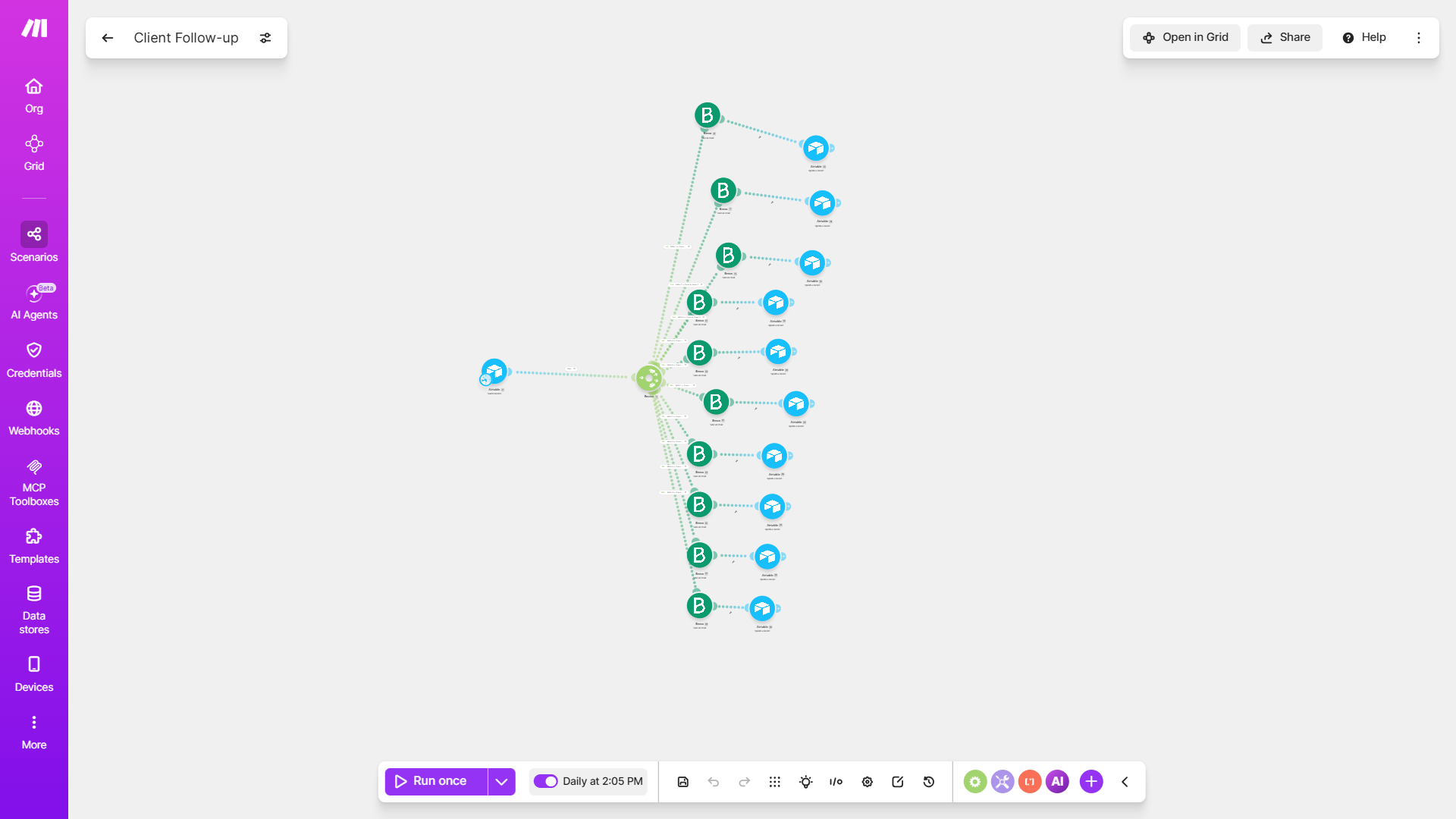
Connect Make.com to the tools your business already uses
As a Make.com Automation Expert we build visual scenarios that link your CRM, forms, spreadsheets, inboxes and project tools, so information moves automatically between every platform you rely on.
Scenario & Automation Types
We build Make.com scenarios that fit exactly how your business already works
Airtable Sync
Two-way scenarios that keep your Airtable bases updated automatically from forms, emails, payments and other connected apps.
See Airtable integration →GoHighLevel Integration
Sync leads, pipelines and calendars between Make.com and GoHighLevel, so nothing has to be entered twice.
See GoHighLevel integration →Custom Scenarios & Webhooks
Multi-step logic, filters, routers and webhook connections for tools without a built-in Make.com app, so nothing gets left out.
See how a Make.com Automation Expert solves real business problems
Short examples from the systems we build. Same approach works for coaches, contractors, clinics, agencies and most service businesses.
The problem most businesses face
Most businesses run on more tools than they used to. A CRM, a spreadsheet, invoicing software, maybe a form tool or an AI assistant. Each one works fine on its own, but moving information between them is still manual. Someone is exporting a file, copying numbers across, or checking three different places just to get one task done. A Make.com Automation Expert starts by mapping exactly where that manual work is happening.
How we solve it inside Make.com
Make.com connects to over 2,000 apps, and when a tool isn't on that list, we connect it directly through its API or a webhook, so nothing gets left out. We build scenarios that move information the moment it's created, and where a step needs some judgment, like sorting a message or checking if details are complete, we can build that in with AI. As your Make.com Automation Expert we build around how your business already operates, not around a generic workflow template.
Why businesses trust a Make.com Automation Expert
You get scenarios that are tested, documented and handed over clearly. You see real builds, not slides. You keep direct access to the people who designed the logic. And you get support after launch so the system keeps working as your tools and processes change. That is the difference between a quick setup and a system your team can actually run.
What a Make.com Automation Expert sets up for your business
Make.com is more than a simple zap between two apps. As a Make.com Automation Expert we build scenarios, connections and logic that coaches, contractors, clinics, agencies and service businesses use every day across the USA, UK, Australia and worldwide so information moves between your tools without anyone copying it by hand.
See real builds on our portfolio. You can also explore related work with Airtable and GoHighLevel.
Book ConsultationSelect a starting point for your Make.com project
Drag to the range that feels right. A Make.com Automation Expert will use it as a conversation starter, not a final quote.
Opens your email with the selected amount and a short template so you can tell us about the project.
How we work with you as a Make.com Automation Expert
A clear process so you always know what happens next. No guesswork, no long gaps, no scenarios only we understand.
Discovery
We learn how your business runs today, which apps you already use, and where information still has to be moved between them by hand.
Map the flow
We outline the triggers, steps, routers and connections that need to run inside Make.com so nothing important depends on someone remembering a manual step.
Build inside Make.com
Your Make.com Automation Expert builds the scenarios, API and webhook connections so the system matches how your team actually works.
Test every path
We run each scenario end to end with real data, fix gaps, and make sure every step and error case behaves the way it should before anything goes live.
Handover
You get clear notes and a short walkthrough so your team can follow how each scenario runs without calling us for every small change.
Support after launch
We stay available so you can ask questions, adjust a scenario, or add a new connection as your business changes.
Frequently asked questions about Make.com
Clear answers on what Make.com is, who it is for, and why businesses use it
What is Make.com?
Make.com is a visual automation platform that connects your apps together so information moves between them on its own. You build a scenario by linking steps on a canvas, and it runs in the background every time something happens, like a form being submitted or a payment coming in.
Who should use Make.com?
It works well for coaches, contractors, clinics, agencies, e-commerce brands and any business connecting a CRM, spreadsheet, inbox, forms or payment tool together, without wanting to touch code to do it.
Why is Make.com useful for service businesses?
Most service businesses run several tools that don't talk to each other, so someone ends up copying information between them by hand. A Make.com Automation Expert connects those tools directly, so updates happen once and reach everywhere they need to.
What can you automate with Make.com?
Lead follow-up, appointment reminders, invoice creation, data syncing between apps, file organizing, report generation and multi-step approvals. Make.com connects to over 2,000 apps directly, and to anything else through its API or webhooks, so almost nothing is off limits.
What is a scenario in Make.com?
A scenario is what Make.com calls one automated workflow. It starts with a trigger, like a new form entry, then runs through a series of steps such as filtering data, updating a record or sending a message, and finishes on its own without anyone touching it.
Is Make.com the same as Zapier?
They solve similar problems, but Make.com gives you a visual canvas with more control over logic, branching and error handling, which makes it a better fit for multi-step or more complex workflows. We work with both, and choose whichever one fits the specific project.
Can Make.com connect to Airtable and GoHighLevel?
Yes. Make.com connects directly to Airtable and GoHighLevel, so records, leads and pipeline updates can sync between them without manual entry. See our dedicated Airtable and GoHighLevel pages for more on those integrations.
Is Make.com good for agencies and coaches?
Yes. Agencies often use it to move client data between their CRM, project tools and reporting dashboards automatically. Coaches use it to connect booking, payment and email tools so onboarding happens without manual steps. The same approach also fits contractors, clinics and other service businesses.
Tired of Doing Everything By Hand?
Let's Make Your Business Run Itself
We build automation systems for e-commerce brands, coaches, churches, contractors and trade businesses, medical practices, and real estate teams, and more industries beyond that.
Contact
- hello@hostandflowautomation.com
- +1 (323) 510-4582
- Serving clients across the US, UK, Australia, Europe & Worldwide
© 2026 Host & Flow Ltd. All Rights Reserved by Host & Flow Automation.